
Download Karo Graph – Simple Diagramming Tool, Free Vector Art, Flowchart Software
Overview
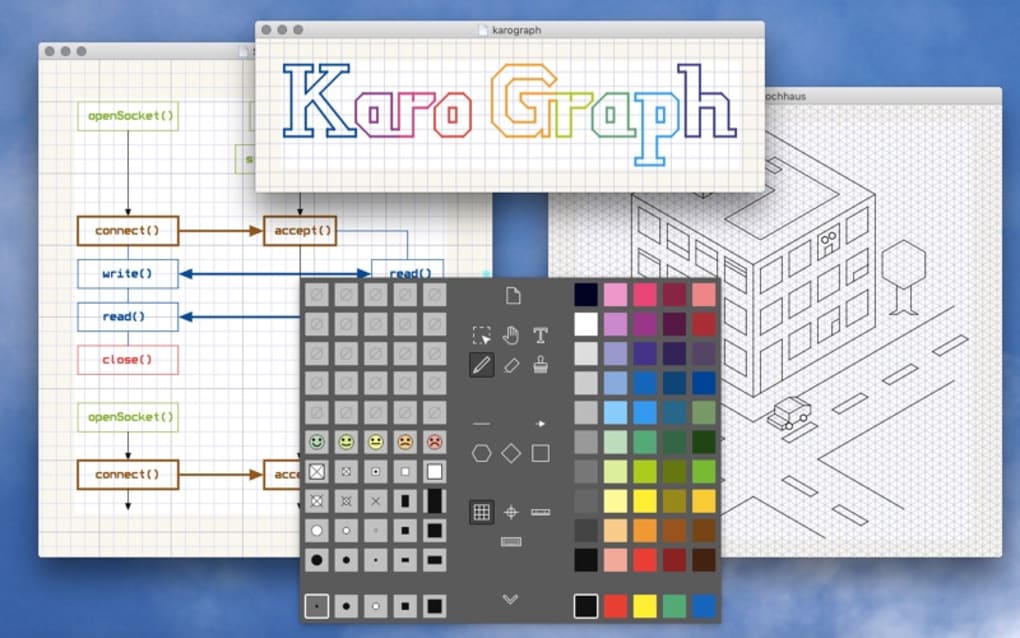
Karo Graph is a lightweight, yet surprisingly powerful diagramming tool designed for users who prefer the simplicity of hand‑drawn sketches combined with the precision of digital graphics. Unlike many heavyweight vector editors, Karo Graph focuses on the essentials: drawing arrows, lines, text, and custom symbols with an intuitive interface that mimics the natural feel of pen‑on‑paper. This makes it an ideal choice for creating quick technical drawings, flowcharts, code documentation, or even rough drafts for presentations.
The program supports a range of export formats—including PDF, SVG, EPS, and TXT—ensuring that your diagrams can be shared or incorporated into other workflows without hassle. Whether you’re a student drafting a network topology, a developer documenting API endpoints, or a business analyst sketching a process map, Karo Graph offers a flexible canvas that adapts to your needs while keeping the learning curve shallow. Its unique line‑width controls, customizable rulers, and a library of symbols give you the freedom to experiment without the clutter of unnecessary features found in larger suites.
In short, Karo Graph delivers a secure, free‑to‑try experience that bridges the gap between analog sketching and digital precision.
Key Features
- Free‑hand drawing experience: Mimics the feel of paper‑based sketching while staying fully digital.
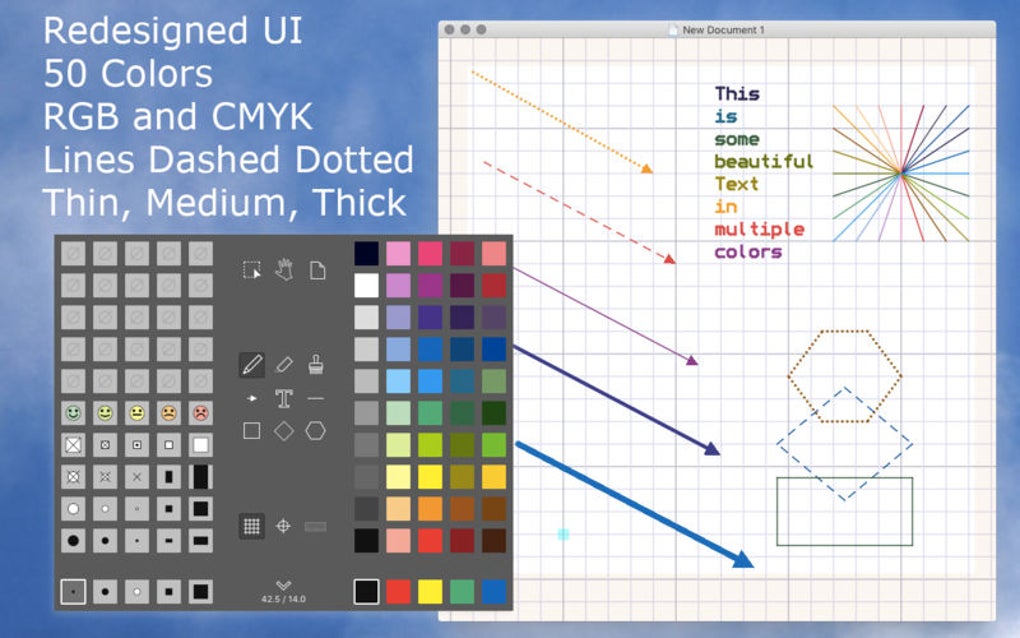
- Arbitrary line widths & colors: Adjust thickness and hue on a per‑segment basis for maximum visual control.
- Customizable rulers: Snap‑to‑grid, angle guides, and measurement tools help maintain accuracy.
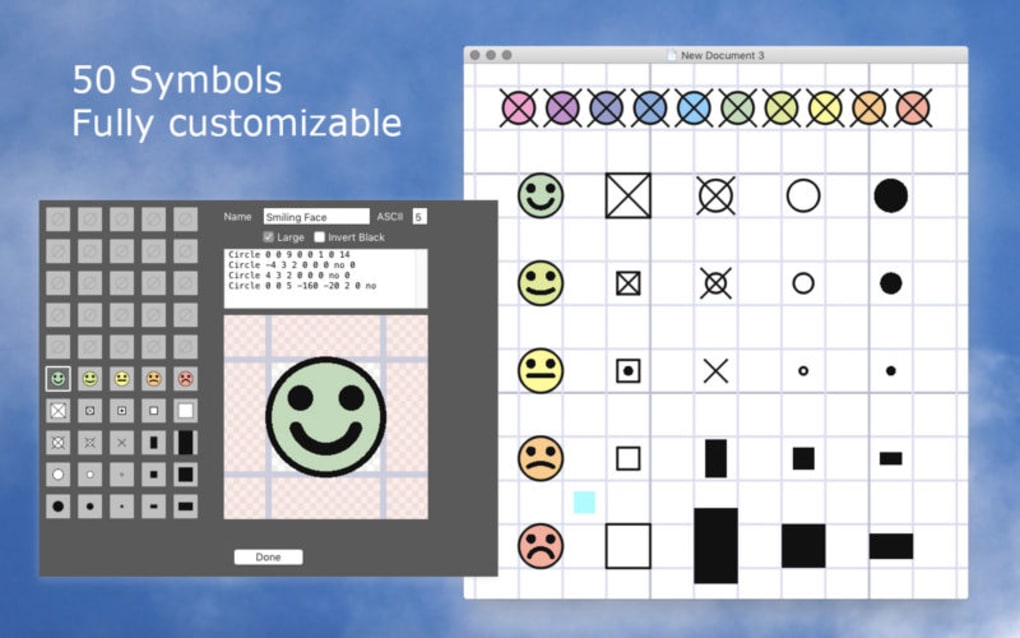
- Extensive symbol library: Includes arrows, flowchart shapes, electrical symbols, and user‑defined icons.
- Multi‑format export: Save your work as PDF, SVG, EPS, or plain‑text (TXT) for seamless integration.
- Text handling: Inline editing, font selection, and automatic text wrapping for clear labeling.
- Lightweight performance: Runs smoothly on modest hardware, consuming minimal RAM and CPU.
- Cross‑platform support: Available for Windows, macOS, and Linux distributions.
- Secure updates: Automatic, signed updates keep the application safe from tampering.
- Intuitive UI: Context‑aware toolbars and right‑click shortcuts accelerate workflow.
Each of these features has been designed with a specific user scenario in mind. For example, developers often need to annotate code snippets; Karo Graph’s TXT export lets you embed diagram data directly into source files, preserving version control history. Meanwhile, educators can quickly assemble flowcharts for lectures and export them as high‑resolution PDFs for handouts. The flexibility of arbitrary line widths also means you can emphasize critical paths in a network diagram without switching tools. By keeping the feature set focused yet comprehensive, Karo Graph avoids the bloat that hampers many competing applications, allowing you to stay in the creative zone longer.
Installation, Usage & Compatibility
Getting Started
Downloading Karo Graph is straightforward. Visit the official website, click the “Download for Windows/macOS/Linux” button, and the installer will begin automatically. The installer is signed with a digital certificate, ensuring a secure installation process. Once the download completes, run the installer and follow the on‑screen prompts. The setup wizard detects your operating system and configures the appropriate shortcuts, including a desktop icon and a Start‑Menu entry on Windows, or a .app bundle in your Applications folder on macOS.
First‑time launch
When you open Karo Graph for the first time, you’ll be greeted by a clean canvas and a toolbar that houses the core drawing tools. The interface is deliberately minimalist: a left‑hand panel for shape selection, a top toolbar for line and color adjustments, and a right‑hand properties pane that updates contextually based on the selected object. To begin a diagram, simply choose a line tool, click on the canvas, and drag to create a segment.
Double‑click any segment to edit its width or color. Adding text is as easy as selecting the “T” icon, clicking on the desired location, and typing. All changes are saved automatically in the background, but you can also manually save a project file (.kgp) for later edits.
System Requirements
Karo Graph runs on the following operating systems:
- Windows 10, 11 (64‑bit)
- macOS 12 Monterey or later (Intel and Apple Silicon)
- Popular Linux distributions (Ubuntu 20.04+, Fedora 34+, Debian 11)
The application requires a minimum of 2 GB RAM and 100 MB of disk space. Because Karo Graph is vector‑based, it scales smoothly on high‑resolution displays, including 4K monitors and Retina screens. No additional runtime libraries are needed; the installer bundles all necessary dependencies, making the software ready to use immediately after installation.
Workflow Tips
For power users, keyboard shortcuts dramatically speed up diagram creation: Ctrl + Z for undo, Ctrl + S to force a save, and Space while dragging to temporarily switch to the hand tool for panning. The ruler can be toggled with R, and you can lock objects to prevent accidental modifications. Exporting is just a click away—choose “File → Export” and select the desired format. The SVG export retains editability in other vector editors, while the PDF option is perfect for sharing with stakeholders who may not have Karo Graph installed.
Pros & Cons
Advantages
- Simple, paper‑like drawing experience that reduces the learning curve.
- Highly customizable line widths and colors for precise visual hierarchy.
- Lightweight footprint – runs smoothly on older hardware.
- Supports multiple export formats, ensuring compatibility with other tools.
- Cross‑platform availability (Windows, macOS, Linux).
- Secure, signed updates keep the application safe.
Drawbacks
- Limited advanced vector editing features compared to full‑blown suites like Adobe Illustrator.
- No built‑in collaboration or cloud sync; files must be shared manually.
- Symbol library, while decent, is not as extensive as specialized diagramming platforms.
- No native mobile app; only desktop environments are supported.
Overall Rating: 4 out of 5 stars
Frequently Asked Questions
Is Karo Graph free to use?
Yes, Karo Graph offers a fully functional free version. A paid “Pro” license is optional and provides additional symbol packs and priority support, but the core drawing tools remain free.
Can I import existing diagrams from other software?
Karo Graph can import SVG files, allowing you to bring vector graphics created in other editors. However, native import of formats like .vsdx (Visio) or .drawio is not currently supported.
How does Karo Graph handle large projects?
Because the application is vector‑based and lightweight, it handles large canvases efficiently. The only limitation is available system memory; for extremely complex diagrams, consider breaking the work into separate files.
Is there a way to customize the symbol library?
Yes, users can create custom symbols by drawing them on the canvas and saving them as reusable templates. These templates appear in the “My Symbols” panel for quick access.
What export format is best for printing high‑resolution diagrams?
Exporting to PDF or SVG is recommended for high‑resolution printing. Both formats preserve vector data, ensuring that the diagram scales without pixelation.
Conclusion & Call to Action
In the crowded landscape of diagramming software, Karo Graph stands out by delivering a focused, user‑friendly experience that feels as natural as sketching on paper while providing the precision and export options expected of modern tools. Its lightweight nature, cross‑platform support, and secure update mechanism make it a reliable choice for students, developers, and professionals alike. While power users may miss some advanced features found in larger suites, the core functionality—custom line widths, an intuitive ruler system, and flexible export formats—covers the majority of everyday diagramming needs. If you’re looking for a free, secure, and easy‑to‑learn tool to quickly turn ideas into clear visual representations, Karo Graph is worth a download. Get started today by downloading the latest version and enjoy the simplicity of creating diagrams without the usual overhead.







